Grok Imagine Video 1.5 vs Seedance 2.0 vs Seedance 2.5: How AI Video Inputs Are Evolving
Try Image GeneratorImgtovid AI Team
14 min read
Grok Imagine Video 1.5 vs Seedance 2.0 vs Seedance 2.5: How AI Video Inputs Are Evolving
AI video generation is no longer defined only by how well a model can turn a prompt into a video.
As models become capable of understanding images, video, audio, and more complex instructions, another factor is becoming increasingly important: how information is structured before generation begins.
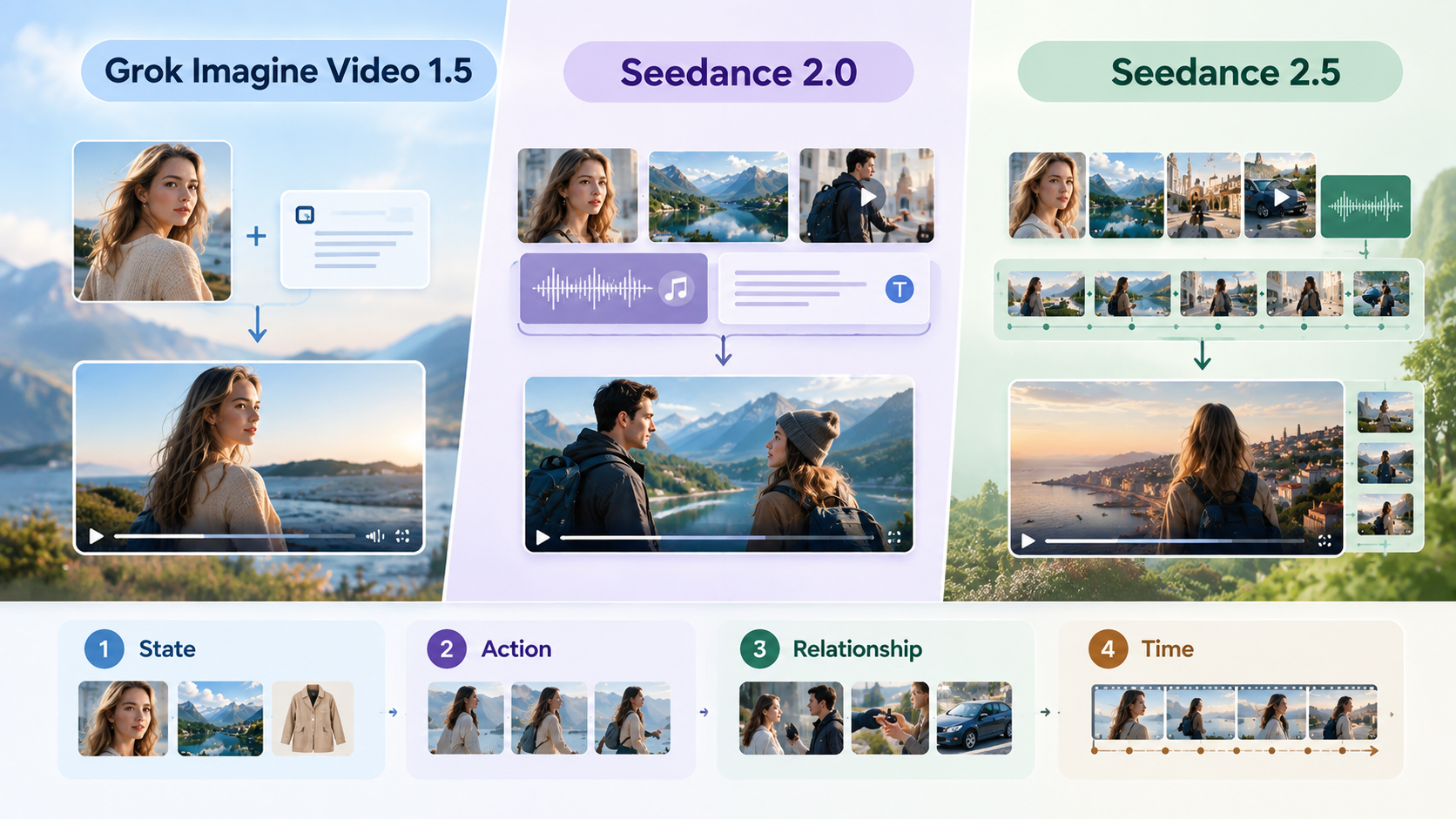
Grok Imagine Video 1.5, Seedance 2.0, and Seedance 2.5 all support multimodal video creation, but they approach input information in different ways. Grok Imagine Video 1.5 places strong emphasis on visual references and image-driven generation. Seedance 2.0 brings multiple media types together within a unified input structure. Seedance 2.5 expands this approach further with a larger reference scope, longer generation, and more precise temporal editing.
The difference is therefore not simply about how many input types a model accepts. It is about what role each input can play in defining the final video.
This article looks at these three models through that lens: how their input structures differ, how references and prompts work together, and how creators can design inputs more effectively before generation.
What the Three Models Officially Support
The three models have overlapping capabilities, but their supported input structures are not identical.
Model | Main Input Types | Reference Approach | Key Input Characteristics |
Grok Imagine Video 1.5 | Text, image, audio | Image references and optional preset voices | Visual-first generation with text describing motion and transformation |
Seedance 2.0 | Text, image, video, audio | Multiple coordinated references | Combines different media types within a single generation |
Seedance 2.5 | Text, image, video, audio | Larger multimodal reference set | Expanded reference scope, longer sequences, and more precise editing |
Grok Imagine Video 1.5 currently supports text-to-video, image-to-video, and reference-to-video. xAI's documentation lists text, image, and audio as input modalities, with video as the output modality. The model supports native 1080p for text-to-video and image-to-video, while reference-to-video has different resolution constraints.
Seedance 2.0 supports text, images, video, and audio as coordinated inputs. Its multimodal design allows different references to contribute different kinds of information, including visual composition, movement, camera behavior, and audio characteristics.
Seedance 2.5 builds on this structure with a larger reference capacity and stronger support for longer-form generation, extension, and precise editing. The result is a broader input space in which creators can define not only what a scene should look like, but also how multiple elements should behave and change over time.
This creates three distinct ways of thinking about AI video inputs.
Three Ways to Structure AI Video Inputs
Visual-First: Grok Imagine Video 1.5
Grok Imagine Video 1.5 can be understood as a visual-first generation approach.
The starting image can establish the visual state of the scene, while the prompt explains what should happen to that state.
For example, instead of describing an entire character, environment, composition, and movement from scratch, a creator can provide an image that already contains much of the desired visual information and then use the prompt to describe the transformation:
A woman stands beside the window as the curtain moves gently in the wind. The camera slowly pulls back.
The image establishes the appearance and composition. The prompt establishes movement and camera behavior.
This separation can make the input relatively direct when a strong visual starting point already exists.
Grok Imagine Video 1.5 also supports reference-to-video, allowing multiple reference images to be used as part of the generation process. This expands the model beyond a single starting frame while maintaining a strongly visual input structure.
The important characteristic here is not simply that the model accepts images. It is that visual references can carry a large portion of the scene definition before the prompt describes the transformation.
Multimodal: Seedance 2.0
Seedance 2.0 takes a broader approach by allowing text, images, video, and audio to participate in the same generation process.
This means different inputs can contribute different types of information.
An image can define a character or visual style.
A second image can provide an environment or composition.
A video can demonstrate movement or camera behavior.
An audio reference can provide dialogue, rhythm, or other sound characteristics.
Text can then connect these elements through natural-language instructions.
Instead of asking one input to describe everything, the creator can distribute information across different media.
For example:
· Image 1: character appearance
· Image 2: clothing reference
· Image 3: environment
· Video: movement reference
· Audio: dialogue or sound reference
· Prompt: instructions describing how the elements should interact
The result is a more coordinated input structure.
This is particularly significant because the creator does not need to translate every visual or auditory detail into text. Instead, each reference can provide information in the medium where that information is most naturally expressed.
Temporal: Seedance 2.5
Seedance 2.5 extends the multimodal approach toward temporal structure.
Its larger reference capacity, longer generation duration, extension capabilities, and more precise editing allow inputs to describe not only the state of a scene but also how that scene changes.
This introduces another dimension to AI video generation.
A creator may want to define:
· what the character looks like,
· where the character is,
· what the character is doing,
· how the camera moves,
· what happens next,
· when a transition occurs,
· and how the audio changes alongside the visuals.
These requirements are difficult to represent with a single image and a short prompt.
Temporal inputs become more useful when the desired result depends on sequence rather than a single visual moment.
This is where Seedance 2.5's expanded multimodal references and editing capabilities become particularly relevant. Instead of treating generation as one isolated transformation, the input can provide information about a developing scene and its changes over time.
A Four-Layer Framework for AI Video Inputs
Although each model has its own interface and capabilities, AI video inputs can be understood through four basic layers:
1. State
2. Action
3. Relationship
4. Time
Thinking about inputs this way can help prevent prompts and references from becoming unnecessarily complicated.
State — What Should Exist?
State describes what should be present in the generated scene.
This includes:
· characters,
· objects,
· clothing,
· locations,
· visual styles,
· lighting,
· composition,
· and other persistent visual characteristics.
Images are often highly effective for defining state because they provide direct visual information.
For example, if a creator wants a specific character wearing a particular outfit, a reference image can establish those visual properties more efficiently than a long textual description.
The more information that can be reliably established through a reference, the less the prompt needs to describe from scratch.
Action — What Should Change?
Action describes what happens during the video.
Examples include:
· walking,
· turning,
· dancing,
· opening a door,
· lifting an object,
· changing facial expressions,
· moving the camera,
· or changing the environment.
This is where textual instructions become especially useful.
A reference image may show a person standing in a room, but it does not automatically specify that the person should walk toward the camera.
The prompt provides the transformation.
A useful principle is:
Reference defines the state. Prompt defines the action.
This is not an official terminology used by the model providers. It is simply a practical way to organize the information being supplied to a video model.
Relationship — How Should Elements Interact?
A more complicated problem appears when multiple elements need to interact.
For example:
· a person picks up a cup,
· two characters talk to each other,
· a character walks around a table,
· an object moves from one person to another,
· or a camera moves around a subject while maintaining a specific composition.
These actions require more than defining individual objects.
The model needs to understand the relationship between them.
This is why simply adding more reference images does not automatically produce better control.
If several references independently describe different parts of a scene but do not explain how those parts relate to one another, the model may have more information without having a clearer instruction.
Text becomes important here because it can connect references into a coherent scene.
For example:
The woman in the first reference wears the jacket shown in the second reference and walks toward the car shown in the third reference.
The references establish the visual information. The instruction establishes the relationship.
Time — When Should Each Event Happen?
The final layer is time.
A video is not a collection of independent images. Events happen in a sequence.
Consider a simple scene:
1. A character enters the room.
2. The character looks toward the window.
3. The camera follows.
4. The character opens the window.
5. Wind moves the curtains.
6. The camera slowly pulls back.
If these events are presented without clear sequencing, the model has to infer the order.
Temporal structure becomes more important as the scene becomes longer or more complex.
This is one of the areas where Seedance 2.5's longer generation, extension, and editing capabilities can become useful. The model is designed to work with more extensive multimodal references and more precise changes across a sequence.
The key question is no longer only:
What should the video contain?
It becomes:What should happen, in what order, and at what point in the sequence?
How to Structure Inputs for Different Creative Starting Points
The best input structure depends heavily on what information is already available.
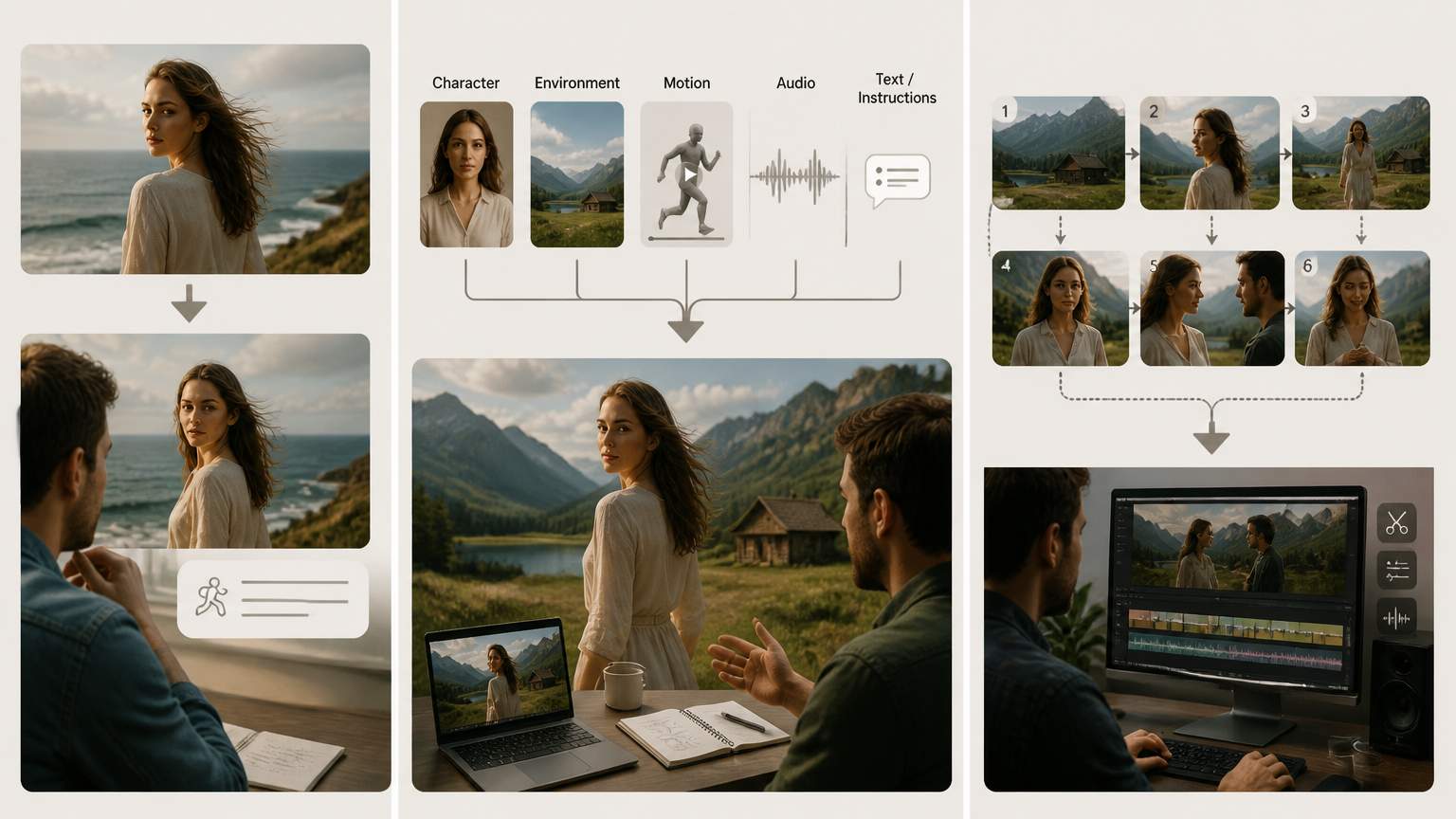
When You Already Have a Strong Visual
If the starting point is a finished image, the most efficient approach is often to let that image carry as much visual information as possible.
The reference can establish:
· character appearance,
· environment,
· composition,
· clothing,
· lighting,
· and overall visual style.
The prompt can then focus on movement.
For example:
The character slowly turns toward the camera while the camera moves backward. Hair and clothing respond naturally to the wind.
This is more efficient than repeating every visual detail already visible in the image.
For this type of input, the goal is not to describe the image twice.
The goal is to use the reference for what it already communicates and reserve the prompt for information that needs to be added.
When Information Is Distributed Across Media
Sometimes the desired result cannot be represented by a single image.
A creator may have a character reference, an environment reference, a movement clip, and an audio reference.
In this situation, combining multiple media types can be more useful than trying to compress everything into a single textual prompt.
Seedance 2.0 is designed around this type of multimodal coordination, supporting text, image, video, and audio inputs within the same generation framework.
The key is to assign a clear role to each reference.
For example:
Input | Information Provided |
Character image | Appearance |
Environment image | Location and composition |
Motion video | Movement |
Audio | Voice or sound characteristics |
Text prompt | Relationships and instructions |
This structure makes the input easier to reason about.
Instead of asking every reference to influence everything, each input contributes a specific category of information.
When the Scene Depends on Sequence and Revision
Longer scenes introduce another challenge: the creator may need to control not only the initial state but also what happens later.
For example, a short narrative may require:
· an establishing shot,
· character movement,
· a change in camera angle,
· a new interaction,
· a transition,
· and a final action.
In such cases, the input should reflect the structure of the scene rather than treating the entire sequence as one visual description.
Seedance 2.5 is particularly relevant here because its design expands reference capacity, generation length, extension, and editing. It supports larger multimodal reference sets and more precise audio/video editing, making it possible to work with more information across a developing sequence.
The objective is to make the temporal logic explicit rather than relying entirely on the model to infer it.
More References Do Not Always Mean More Control
One of the most common assumptions in multimodal video generation is that adding more references will automatically improve the result.
It does not.
More references can provide more information, but they can also introduce:
· redundancy,
· conflicting visual details,
· competing styles,
· unclear priorities,
· or unnecessary complexity.
Consider a character generation task.
If three images all show essentially the same character from similar angles, adding all three may contribute little additional information.
By contrast, three complementary references can be much more useful:
· one for facial identity,
· one for clothing,
· one for environment.
The difference is information coverage, not reference count.
A useful principle is:
Optimize for information coverage, not the number of references.
Every additional reference should answer a question that the existing inputs cannot answer clearly.
Common Input Problems and How to Fix Them
Redundant References
Multiple references that communicate the same information can make the input unnecessarily large without improving control.
Better approach: remove references that do not add meaningful information.
Ask:
What does this reference contribute that the others do not?
If the answer is “almost nothing,” it probably does not need to be included.
Conflicting Visual Information
References can also disagree.
For example, one image may show a character with short hair while another shows long hair. One may use a realistic style while another uses a highly stylized aesthetic.
When these differences are not intentional, the model has to determine which information should take priority.
Better approach: make the role of each reference clear and avoid mixing incompatible visual instructions.
Missing Motion Information
A strong image can define the starting state but cannot always explain the intended movement.
A prompt such as:
A cinematic woman in a city.
does not tell the model what should happen.
Better approach: describe the action, camera movement, and environmental changes explicitly.
For example:
She walks slowly toward the camera while the camera tracks backward. Wind moves her hair and coat naturally.
The prompt now adds information that the image cannot provide.
Unclear Relationships
When several subjects or objects appear in the input, their relationships need to be clear.
A prompt that simply lists objects may not explain how they interact.
Compare:
A man, a woman, a car, and a city street.
with:
The man opens the passenger door for the woman while the car remains parked beside the sidewalk.
The second instruction establishes a relationship between the elements.
Unclear Sequence
Complex scenes can fail when several actions are described without a clear order.
Instead of:
The character enters, talks to the woman, opens the door, and walks outside.
a more structured instruction can clarify the progression:
First, the character enters the room. He approaches the woman and speaks with her. After the conversation, he opens the door and walks outside.
The difference is small in text but significant in temporal structure.
Final Takeaway: Design the Input Before the Video
The evolution from Grok Imagine Video 1.5 to Seedance 2.0 and Seedance 2.5 illustrates a broader shift in AI video generation.
The challenge is gradually moving from:How do I write a better prompt?
to:How should I organize all the information the model needs?
Grok Imagine Video 1.5 is well suited to a visual-first structure in which a strong image establishes the scene and the prompt describes how it should change. Its current capabilities also extend to reference-to-video generation with multiple image references.
Seedance 2.0 expands the input space by coordinating text, images, video, and audio. This makes it possible to distribute information across different media instead of relying on text alone.
Seedance 2.5 pushes the same direction further by expanding reference capacity and introducing stronger support for longer generation, extension, and precise editing.
The broader lesson is simple:
A good AI video input is not necessarily the longest prompt or the largest collection of references. It is the input structure that gives each piece of information a clear role.
A practical way to think about that structure is:
· State: What should exist?
· Action: What should change?
· Relationship: How should elements interact?
· Time: When should each event happen?
Once these four layers are clear, choosing what to include—and what to leave out—becomes much easier.
The future of AI video prompting may therefore be less about writing more and more about designing information more deliberately.
FAQ
What Is the Difference Between an AI Video Reference and a Prompt?
A reference provides visual, audio, or other concrete information that the model can use as part of generation.
A prompt provides instructions about what should happen.
For example, an image can establish a character's appearance, while the prompt can describe the character walking toward the camera.
In simple terms:
Reference = information about the desired state.
Prompt = instructions about the desired change.
The distinction becomes less absolute as models become more multimodal, but it remains a useful way to organize inputs.
How Many References Should I Use for AI Video Generation?
There is no universal number that guarantees better results.
The better rule is to use enough references to cover the information that matters, while avoiding unnecessary or conflicting inputs.
For a simple image-to-video task, one strong reference may be enough.
For a more complex multimodal scene, multiple images, videos, or audio references may be useful.
The goal should be complementary information rather than maximum reference count.
Can Grok Imagine Video 1.5 Use Multiple References?
Yes. Grok Imagine Video 1.5 supports reference-to-video generation with multiple reference images. xAI's current documentation provides examples using separate references for different visual elements, such as a subject and an outfit.
This makes it possible to move beyond a single starting image while maintaining a relatively visual input structure.
What Makes Seedance 2.0 Different from Seedance 2.5?
Both models use multimodal inputs, including text, images, video, and audio.
The main difference is the scale and temporal scope of the input and generation process.
Seedance 2.0 introduced a unified multimodal structure for coordinating different media types.
Seedance 2.5 expands that structure with a larger reference capacity, longer generation, multiple rounds of extension, and more precise editing capabilities.
In other words, Seedance 2.0 established a broader multimodal input framework, while Seedance 2.5 extends that framework toward longer and more editable sequences.
Do More AI Video References Produce Better Results?
Not necessarily.
Additional references are useful only when they provide information that is missing from the existing input.
Too many references can introduce redundancy or conflicting information.
A better strategy is to ask:
What information is still undefined?
Then add the reference that provides that information.
This turns reference selection from a quantity problem into an information-design problem.